

Table of Contents
- What You'll Need Before You Start
- Step 1: Dry-Brush the Speaker Mesh
- Step 2: How to Remove Earwax from Earbuds Without Damaging Them
- Step 3: Wipe the Housing and Charging Contacts
- Step 4: Let Everything Dry Completely
- The Best Tools for Cleaning Earbuds (and What to Avoid)
- How Often to Clean Wireless Earbuds
- Common Mistakes That Damage Earbud Speakers
- Frequently Asked Questions
Last Updated: 17 September 2026
What You'll Need Before You Start
To clean earbud speakers safely comes down to one rule: dry tools first, and never let liquid near the mesh. Most earbuds fail not because of sweat or daily wear, but because owners flood the speaker grille with cleaning fluid and push wax deeper into the driver.
This guide walks through the exact steps we recommend, in order, using tools you probably already own.
Gather these before you touch your earbuds:
- A soft-bristled brush, like a clean dry toothbrush
- A dry microfibre cloth
- Wooden toothpicks or a plastic pick
- Blu-Tack or cleaning putty
- A small torch or your phone light
- Isopropyl alcohol wipes (70% or higher), for the housing only
Total time: 10 to 15 minutes Difficulty: Beginner
Skip the cotton buds. They shed fibres and push wax further in, which is the opposite of what you want.
Step 1: Dry-Brush the Speaker Mesh
Start every clean with a dry brush, before anything else touches the earbud. This lifts loose dust and surface wax without pushing debris into the speaker.
Hold the earbud so the mesh faces down. Brush in one direction, away from the centre of the grille, not in circles. Circular brushing drags wax back across the holes you just cleared.
Work around the edge of the mesh first, then the centre. Tap the earbud gently against your palm every few strokes to shake loose particles free.
A common mistake is brushing hard. Light pressure is enough. The mesh on most wireless earbuds is thin, and pressing down can dent it or tear it away from the housing.
If you can see grey or yellow buildup in the grille, that is wax, and brushing alone will not shift it. Move to step 2.
Step 2: How to Remove Earwax from Earbuds Without Damaging Them
Learning how to remove earwax from earbuds safely means lifting it out, never digging it in. Wax sits on top of the mesh, so the goal is to pull it up and away.
Use a wooden toothpick at a shallow angle. Slide the tip under the edge of the wax and flick it outward. Never push the toothpick straight into the grille.
For wax that has hardened, press a small ball of Blu-Tack or cleaning putty onto the mesh. Leave it for a few seconds, then peel it away. The wax comes with it.
Repeat with a fresh piece of putty until nothing else lifts off. Then give the mesh one more dry brush to clear the loosened bits.
Step 3: Wipe the Housing and Charging Contacts
The outer shell and charging pins collect skin oils, which is why earbuds start to feel tacky and stop charging reliably. A quick wipe fixes both problems.
Lightly dampen a microfibre cloth with isopropyl alcohol. Wipe the plastic housing, the stem, and the touch controls. Avoid the speaker mesh entirely.
For the charging contacts, use a dry toothpick to scrape away any dark residue. Then wipe with the alcohol cloth and let it air dry for a moment.
Do the same for the inside of the charging case, especially the metal pins at the bottom of each slot. Dirty contacts are the most common cause of one earbud failing to charge.
- Wipe the housing, not the mesh
- Scrape contacts gently with a dry pick
- Clean the case pins too
- Never submerge any part in liquid
Step 4: Let Everything Dry Completely
Drying is the step people rush, and it is the one that causes the most damage. Any moisture left near the mesh can reach the driver once you power the earbuds back on.
Leave everything to air dry for at least 15 minutes after any alcohol wipe. Place the earbuds mesh-down on a dry cloth so gravity pulls moisture away from the grille.
Do not use a hairdryer, a radiator, or direct sunlight. Heat warps the plastic and can loosen the adhesive holding the mesh in place.
Once dry, reconnect the earbuds and play something at low volume. If the sound is clear in both ears, you are done.
The Best Tools for Cleaning Earbuds (and What to Avoid)
The best tools for cleaning earbud speakers are the ones that lift debris without pressing it in. A dedicated kit takes the guesswork out of it, and it costs less than replacing a pair of earbuds.
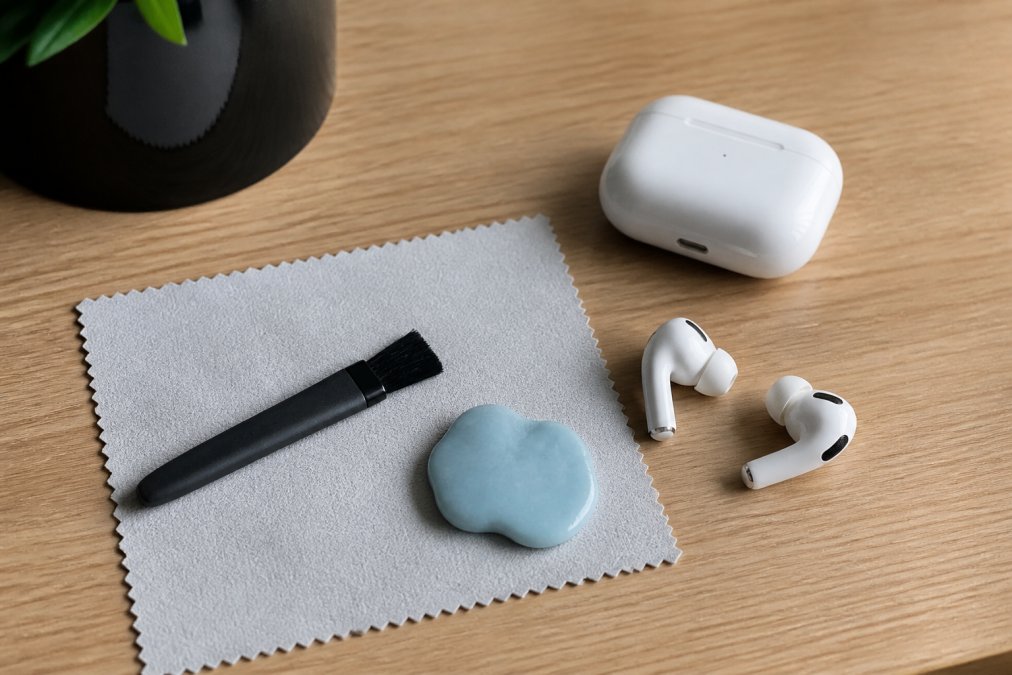
The Airpod Cleaning Kit from Speid's Shop (£10.99) includes everything in the list above in one small case. It removes dust before your commute and keeps the mesh clear, so sound stays crisp. For anyone cleaning earbuds regularly, it is the simplest option.

Here is how the common tools compare:
| Tool | Best For | Avoid If |
|---|---|---|
| Soft brush | Loose dust, daily upkeep | Wax has hardened |
| Cleaning putty | Lifting set wax | Mesh is torn |
| Wooden toothpick | Edges and charging pins | You press too hard |
| Isopropyl wipe | Housing and contacts | You wipe the mesh |
| Cotton bud | Nothing on earbuds | Always, it sheds fibres |
What most guides miss is that compressed air is a gamble. It can clear dust, but it can also force debris straight through the mesh and into the driver. If you use it, keep the can upright and short bursts only.
How Often to Clean Wireless Earbuds
How often you clean wireless earbuds depends on use, but a quick dry brush once a week suits most people. A full clean with putty and alcohol every two to four weeks keeps them in good shape.
Heavy users need more. If you wear earbuds for workouts, commuting, and calls, brush them after every session and do the full routine weekly. Sweat and earwax build up faster than most people expect.
Signs it is time for a clean:
- Volume sounds lower in one ear
- Sound is muffled or tinny
- One earbud will not charge
- You can see wax on the mesh
Cleaning takes minutes. A blocked mesh cutting volume is the first sign most owners notice, and it usually clears up right after a proper clean.
Common Mistakes That Damage Earbud Speakers
The biggest mistake is liquid. Water, cleaning sprays, and wet wipes all push moisture through the mesh and into the driver, and that is the one fault you cannot fix at home.
Other habits that shorten earbud life:
- Pushing wax inward with cotton buds or toothpicks
- Brushing in circles instead of outward strokes
- Using a hairdryer or radiator to speed up drying
- Cleaning the mesh with alcohol instead of a dry brush
- Storing earbuds loose in a bag where the mesh gets crushed
A common mistake is cleaning only when sound drops. By then, wax has already packed into the grille. A weekly dry brush prevents most of it.
For a small outlay, a proper kit removes the guesswork. Speid's Shop offers free delivery and free returns, so trying one carries no risk. Our 30-day returns policy and 5.0 platform-wide reviews back that up.
Frequently Asked Questions
Can I use alcohol wipes to clean my earbud speakers?
Yes, but keep the wipe to the plastic housing and charging contacts rather than the speaker mesh. A 70% isopropyl alcohol wipe evaporates quickly and lifts grease without soaking the grille. Wring it out so it is barely damp, wipe the outside of each bud, then let them air dry for a few minutes before charging. Never pour or spray alcohol directly onto the speaker, because liquid pushed into the mesh can reach the driver and cause crackling or a muffled channel.
How often should I clean my earbud speakers?
A quick dry-brush once a week keeps most earbuds in good shape, with a deeper clean every two to four weeks. If you use them daily for workouts, commuting or long calls, brush the mesh every few days instead. Wipe the charging contacts weekly too, since oil and dust there stop the buds seating properly in the case. You will know a deep clean is due when volume drops on one side or the sound starts to muffle.
Is it safe to use water to clean wireless earbuds?
Only if your model is officially water-resistant, and even then keep water away from the speaker mesh. A cloth lightly dampened with water is fine for the plastic shell and the case, but never run earbuds under a tap or dunk them. Water pushed into the grille can sit against the driver and cause distortion that does not always clear once it dries. For the mesh itself, stick to dry tools such as a soft brush or cleaning putty.
What is the safest way to remove earwax from the earbud mesh?
Work dry first: brush the mesh gently with a soft-bristled brush, holding the bud mesh-down so loosened wax falls away. For wax pressed into the grille, press a piece of cleaning putty or Blu Tack onto the mesh, hold for a few seconds and peel it off. Repeat rather than pressing harder, and never push a pin, toothpick or paperclip through the mesh, because the driver sits just behind it and punctures are permanent.
Earbuds are one of those everyday items people replace far sooner than they need to, usually because a blocked mesh gets mistaken for a broken speaker. A ten-minute routine, done weekly, keeps sound clear and extends the life of your earbuds. Speid's Shop stocks the Airpod Cleaning Kit with everything you need in one case, backed by free shipping, free returns, and secure SSL checkout. Order now and keep your earbuds sounding sharp.


