

Table of Contents
- What You'll Need Before You Start
- Step-by-Step: How to Clean Earwax from Earbuds Safely
- Best Tools for Cleaning Earbud Mesh
- How Often to Clean Earbuds to Prevent Wax Buildup
- How to Clean Earbud Charging Case
- Common Mistakes to Avoid When Cleaning Earbuds
- Conclusion
- Frequently Asked Questions
Last Updated: September 16, 2026
What You'll Need Before You Start
Learning how to clean earwax from earbuds takes about five minutes, and the right kit makes the difference between a quick fix and a ruined mesh.
Earwax removal from earbuds is the process of lifting softened wax from the nozzle, mesh and ear tips of wireless earbuds using dry tools, gentle solvents and soft brushes. The goal is to clear the acoustic path without pushing debris deeper into the housing.
You will need:
- A soft-bristled cleaning brush or the brush included in a dedicated kit
- A dry microfibre cloth
- Wooden or plastic toothpicks
- Isopropyl alcohol (70% or higher) on a cotton pad
- Replacement ear tips in the correct size
- A small bowl of warm water with a drop of mild soap
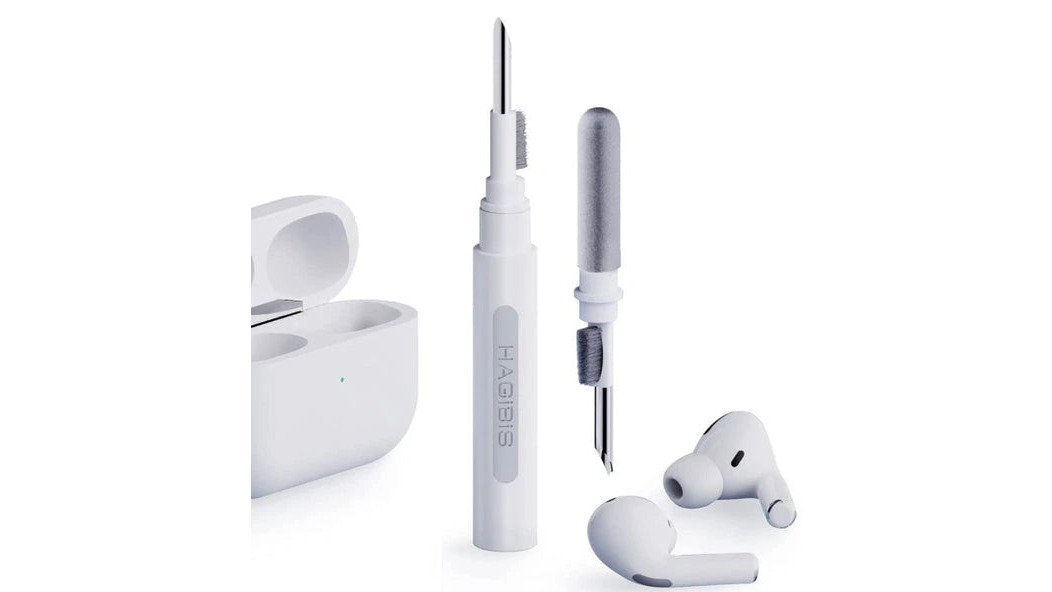
Avoid sharp metal tools, paper clips and cotton buds. These scratch the mesh and compact wax further into the nozzle. For a complete set of safe tools, the Airpod Cleaning Kit at £10.99 covers brushes, picks and cloths in one box.

Step-by-Step: How to Clean Earwax from Earbuds Safely
The safest method works from the outside in: remove the tips, dry-brush the mesh, soften stubborn wax, then clean or replace the tips. Never submerge earbuds in water or run them under a tap. Most wireless models carry an IPX water-resistance rating for sweat and rain, not for immersion, so a quick rinse can kill the drivers.
Work over a clean surface with good light. Wax is easier to see and remove when you are not guessing.
Step 1: Remove the Ear Tips
Gently twist each silicone tip off the nozzle and set it aside. If the tip feels stuck, do not pull hard; a slight rocking motion usually releases it. Check the inside of the tip for wax build-up, because this is where most of the blockage actually sits. A common mistake is cleaning the earbud housing while leaving a wax-lined tip in place, which means the sound stays muffled no matter how well you scrub the mesh.
Step 2: Dry-Brush the Mesh and Nozzle
Hold the earbud nozzle pointing downwards so loosened debris falls away from the driver. Use a dry soft brush in short, outward strokes across the mesh. A wooden toothpick can lift wax from the rim of the nozzle, but keep the point flat against the surface rather than digging in. Brushing downwards matters: work upwards and you push wax straight into the acoustic chamber, which is the single most common way people damage their earbuds.
Step 3: Tackle Stubborn Wax on the Mesh
Dampen a cotton pad with isopropyl alcohol and dab the mesh lightly. Let it sit for a few seconds to soften the wax, then brush again. Never pour or drip alcohol directly onto the earbud, and never let liquid run into the nozzle. For dried, hardened wax, repeat the dab-and-brush cycle two or three times rather than pressing harder. Pressure is what tears mesh, not time.
Step 4: Clean or Replace the Ear Tips
Wash silicone tips in warm water with a drop of mild soap, rinse thoroughly and leave them to air-dry completely before refitting. Damp tips trap moisture against the nozzle and encourage bacteria. If the tips are stretched, discoloured or no longer grip the nozzle, replace them. Tips are cheap; drivers are not. Once everything is dry, refit the tips and test the sound at low volume before your next commute.
Best Tools for Cleaning Earbud Mesh
The best tools for cleaning earbud mesh are soft-bristled brushes, wooden picks and microfibre cloths, because they lift wax without scratching the delicate mesh that protects the driver. Metal tools, cotton buds and compressed air are the three most common causes of avoidable damage.
Here is how the main options compare:
| Tool | Best For | Avoid If |
|---|---|---|
| Soft brush | Daily surface dust and loose wax | Bristles are stiff or frayed |
| Wooden toothpick | Wax on the nozzle rim | You are tempted to dig into the mesh |
| Microfibre cloth | Wiping the housing and charging pins | The cloth is damp |
| Isopropyl alcohol (70%+) | Softening hardened wax on mesh | You cannot keep liquid off the driver |
| Replacement ear tips | Restoring fit and sound after cleaning | Tips still grip and seal properly |
A purpose-made kit saves you assembling these separately. The Airpod Cleaning Kit at £10.99 includes the brush, picks and cloth in a single case, which is the simplest route if you would rather not improvise.
How Often to Clean Earbuds to Prevent Wax Buildup
A quick dry-brush once a week and a deeper clean once a month keeps most earbuds in good condition. If you wear them for several hours a day, exercise in them, or notice volume dropping on one side, clean them more often.
Signs you have waited too long include muffled sound, reduced bass, crackling during calls and visible wax on the mesh. Many users assume the earbuds are failing when the real issue is a blocked nozzle. A two-minute brush often restores the original sound.
Habits that cut wax build-up:
- Wipe the tips with a dry cloth after every use
- Store earbuds in their case rather than loose in a bag
- Clean your ears gently after showering, never with cotton buds
- Rotate between two sets of ear tips so one can dry fully
How to Clean Earbud Charging Case
Cleaning the charging case is mostly about the pins. A dry cotton bud or soft brush removes dust and wax from the metal contacts, and a microfibre cloth wipes the interior surfaces. Do not use water, alcohol or cleaning sprays inside the case, because liquid near the charging contacts can corrode them or damage the battery.
If the earbuds stop charging reliably, dirty pins are the usual culprit rather than a faulty battery. Check the contact points on both the case and the base of each earbud, and brush them gently until they are shiny. For the exterior, a barely damp cloth is fine, but dry it immediately and leave the case open to air for a few minutes before closing it.
Common Mistakes to Avoid When Cleaning Earbuds
The biggest mistake is using cotton buds, which compact wax deeper into the nozzle and can leave fibres behind on the mesh. The second is pushing a brush upwards into the housing instead of brushing debris outwards and downwards.
Other frequent errors:
- Soaking earbuds in water or cleaning solution
- Using metal pins, needles or paper clips on the mesh
- Spraying cleaning products directly onto the earbuds
- Reassembling while the tips or mesh are still wet
- Ignoring the ear tips and cleaning only the housing
Each of these shortens the life of the earbuds. The fix is almost always less force and more patience. If you have already pushed wax into the nozzle, a professional repair may be the only option, so it pays to brush gently from the start.
Conclusion
Earwax build-up is the most common reason wireless earbuds start sounding flat, and it is almost entirely preventable with a weekly brush and a monthly deep clean. The tools matter as much as the technique: soft brushes, wooden picks and the right alcohol strength do the job without risking the mesh.
Speid's Shop stocks the Airpod Cleaning Kit at £10.99, with free delivery, free returns and a 30-day return policy, so you can keep your earbuds sounding crisp without hunting for separate tools. Order now and give your earbuds the five-minute routine they need.
Frequently Asked Questions
Is it safe to use alcohol wipes on earbuds?
Yes, but with care. Isopropyl alcohol wipes are safe for most hard plastic parts, but avoid getting liquid into the speaker mesh or charging contacts. Alcohol can damage the glue holding the mesh and strip protective coatings. Use a lightly dampened wipe, never dripping, and let the earbud dry completely before use. For routine cleaning, a dry brush is safer and just as effective at removing earwax from earbuds.
How do I get earwax out of the mesh part of my earbuds?
Start by brushing the mesh gently with a soft-bristled brush to lift dry wax. For wax lodged in the mesh holes, use a wooden toothpick or the loop end of a cleaning tool to carefully pick it out. Never push the wax further in. If the mesh is clogged, a small amount of isopropyl alcohol on a cotton bud can help dissolve residue, but keep the earbud upside down so liquid doesn't seep inside.
Can earwax damage my wireless earbuds?
Yes. Earwax blocks the speaker mesh, which muffles sound and forces you to turn up the volume, potentially damaging the driver over time. Wax can also work its way into the internal components, causing corrosion or short circuits. Regular cleaning, ideally every few days, prevents build-up and keeps your earbuds working properly. If sound is already muffled after cleaning, the mesh may need professional attention.
How often should I clean my earbuds to prevent wax build-up?
Clean the ear tips and mesh after every few uses, or at least once a week if you use them daily. If you exercise or produce a lot of earwax, clean them after each session. A quick dry brush takes seconds and stops wax hardening. Deep clean the charging case monthly. Following a simple routine with the right tools for cleaning earbud mesh will keep sound quality high and extend the life of your earbuds.


